It starts innocently enough. You sit down to finish a report, and a Slack notification pops up. You answer it in thirty seconds, but then you notice an email preview. You click over to your inbox, skim three messages, open a browser tab to check a reference, see a news headline, and fifteen minutes later you’re watching a video that has absolutely nothing to do with the report you were writing. The report is still sitting there, cursor blinking, waiting.
This is the reality of working in a digital environment, and if it sounds familiar, you are far from alone. Research consistently shows that the average knowledge worker switches tasks every three to five minutes, and it takes roughly 23 minutes to fully recover focus after a significant interruption. Over the course of a day, that math gets brutal.
The good news is that digital distraction management is a learnable skill, not a character trait. You don’t need monk-like discipline or a cabin in the woods. You need practical strategies, the right environmental setup, and a realistic understanding of how your brain actually works. This guide covers all three.
1. Understanding Digital Distraction
Before you can fix a problem, it helps to understand why the problem exists in the first place. Digital distractions are not simply a matter of poor willpower. They exploit deeply wired neurological mechanisms that evolved long before smartphones existed.
Why Your Brain Takes the Bait
Every notification, every unread badge, every vibration from your phone triggers a small release of dopamine — not from the content itself, but from the anticipation of what might be there. Your brain treats each alert as a potential reward, and it has a very hard time ignoring potential rewards. This is why willpower alone is such an unreliable focus productivity technique: you are fighting evolutionary wiring every time you try to ignore a blinking notification.
External vs. Internal Distractions
External digital distractions are the obvious ones — notifications, pings, email alerts, and incoming messages. But internal distractions are just as powerful and far less discussed. These are the moments when you voluntarily pick up your phone without any prompt, or open a new browser tab to check social media out of habit or boredom. Studies suggest that roughly half of all digital interruptions are self-initiated. That means even if you silenced every alert on every device, you would still face significant attention challenges.
The Attention Residue Problem
One of the most important concepts in attention management is what researchers call “attention residue.” When you switch from Task A to check a notification related to Task B, part of your mind stays attached to Task B even after you return. Your focus becomes fragmented, like a browser with too many open tabs consuming memory in the background. This residue accumulates throughout the day, which is why many people feel mentally exhausted by mid-afternoon despite not completing anything particularly demanding.
2. Environmental Setup for Focus
The most effective digital distraction management doesn’t rely on willpower — it relies on environment design. Make the focused choice the easy choice, and the distracted choice harder to reach.
Physical Environment
Where your devices physically sit during work matters more than you might expect. If your phone is on your desk, face up, within arm’s reach, you will check it. Not because you’re weak, but because it’s there. Place your phone in a drawer, in another room, or at minimum face-down and on silent during deep work sessions. Many people find that the simple act of putting their phone behind them — out of their visual field — reduces the urge to check it dramatically.
If you work with multiple monitors, be intentional about what goes on each screen. Dedicate your primary monitor exclusively to your current task. Relegate email, messaging apps, and reference material to a secondary monitor — or better yet, keep those closed entirely during focused blocks.
Digital Environment
Your digital workspace is just as important as your physical one. Start with your browser. If you regularly work with 20 or more tabs open, you are carrying a constant low-level cognitive load just from the visual noise. Use a tab management extension or adopt a strict policy: no more than five to seven tabs open at any time. Close everything else. If you need it later, you can find it again.
Configure your notification settings across all devices with ruthless precision. On your computer, disable banner notifications for everything except truly urgent communication tools. On your phone, audit every app that has notification permission and remove access from anything that is not time-sensitive. Most people discover that 80 percent or more of their notifications add no value to their day.
Schedule Do Not Disturb modes to activate automatically during your peak focus hours. Both major mobile operating systems allow you to create focus profiles that silence specific app categories while letting critical contacts through. Set this up once and it works in the background every day.
3. Strategic Tool Selection
There is an irony in using technology to solve a technology problem, but the right attention management tools can genuinely shift the equation in your favor — as long as you choose them deliberately and avoid the trap of collecting tools instead of using them.
Categories Worth Considering
Website and app blockers allow you to restrict access to distracting sites during scheduled focus periods. You set the rules in advance, and the tool enforces them even when your resolve weakens at 2 PM. This approach works because it externalizes discipline — you made the decision to block a site when you were thinking clearly, and now your future self doesn’t have to fight the battle.
Time tracking applications offer a different kind of value. They don’t block anything; instead, they record how you actually spend your screen time. Most people are genuinely surprised by the results. Seeing that you spent 90 minutes on news sites and 45 minutes on social media during a workday can be more motivating than any productivity lecture.
Focus timer applications, including various Pomodoro technique tools, provide structured work-and-break intervals. The classic Pomodoro approach — 25 minutes of focused work followed by a 5-minute break — works well for many people, though you should feel free to adjust the intervals. Some workers prefer 50-minute focus blocks with 10-minute breaks, especially for complex creative or analytical work that needs longer ramp-up time.
Choosing Without Overloading
The biggest risk with productivity tools is accumulating too many of them. If you spend more time configuring, syncing, and maintaining your focus tools than you save in recovered attention, you have defeated the purpose. Start with one tool that addresses your single biggest distraction pattern. Use it for at least two weeks before adding anything else. For most people, a website blocker or a focus timer alone provides a meaningful improvement without any additional complexity.
Free options exist in every category, so cost shouldn’t be a barrier. Most focus timer apps and basic website blockers offer solid free tiers. Paid versions typically add cross-device syncing and detailed analytics, which are nice but not essential when starting out.
4. Behavioral Strategies and Techniques
Tools set up the guardrails, but your daily habits determine whether you actually stay on the road. These focus productivity techniques work best when layered together and adjusted to fit your natural rhythms.
Time Management for Deep Work
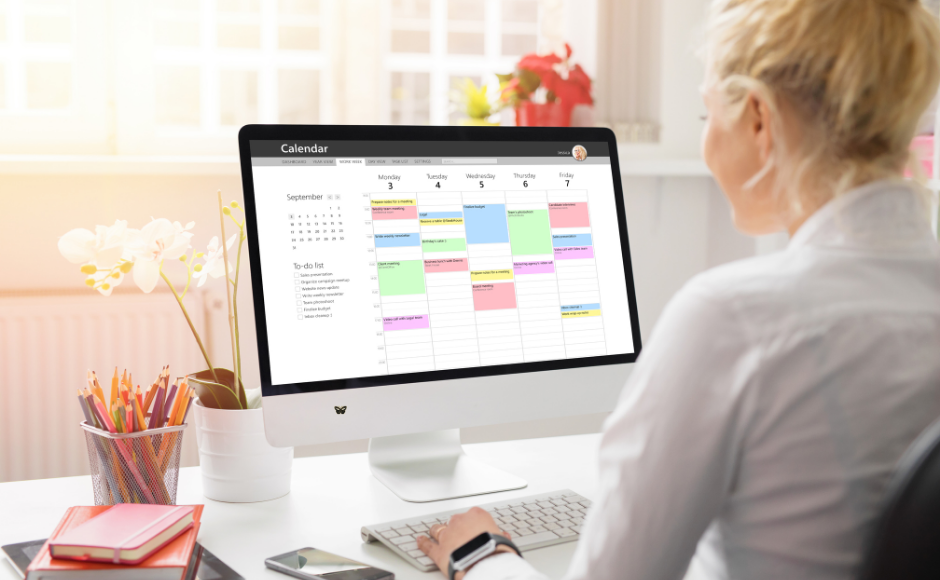
Time blocking is the single most effective deep work strategy for most professionals. The concept is straightforward: instead of working from a to-do list and hoping for uninterrupted time, you block specific hours on your calendar for specific types of work. A two-hour block labeled “quarterly report — no meetings, no email” is far more likely to produce results than a vague intention to “work on the report today.”
Pair time blocking with energy-based scheduling. Most people have a peak focus window of two to four hours per day — often in the morning, though it varies. Schedule your most demanding cognitive work during this window and save routine tasks like email, scheduling, and administrative work for your lower-energy periods. This isn’t about working more; it’s about matching your hardest work to your sharpest hours.
Task batching is another powerful technique. Instead of checking email six times per hour, batch it into two or three scheduled sessions per day. Instead of responding to messages as they arrive, batch responses every 90 minutes. Batching reduces context switching, and every avoided context switch preserves attention residue that you can direct toward meaningful work.
Training Your Attention
Attention is a muscle that strengthens with deliberate practice. Start with single-tasking: choose one task, close everything else, and work on only that task for a set period. If you catch your mind wandering or your hand reaching for your phone, simply notice it and return to the task. This is not a failure — it is the exercise working.
Mindfulness breaks of even two to three minutes between work sessions can reset your attention. Close your eyes, take several slow breaths, and let your mind settle before launching into the next task. This brief pause reduces the attention residue carried over from whatever you were just doing.
Progressive focus building is useful if your attention span has atrophied from years of constant digital stimulation. Start with just 15 minutes of uninterrupted focus. When that feels comfortable, extend to 25 minutes, then 40, then 60. The goal is not to reach some arbitrary marathon session — it is to find the duration that lets you do your best work consistently.
Communication Boundaries
One of the most overlooked aspects of screen time management is the social pressure to respond immediately. Set explicit expectations with your team and clients. Something as simple as “I check email at 9 AM, 12 PM, and 4 PM” is usually more than sufficient for all but the most urgent roles.
Use status messages during deep work blocks. A status that reads “In focused work until 2 PM — will respond after” is professional, clear, and gives others a concrete expectation. Asynchronous communication is almost always preferable to real-time chat for non-urgent matters.
5. Managing Specific Digital Distractions
Different distractions require different strategies. A one-size-fits-all approach rarely works because the pull of each digital channel operates through slightly different psychological mechanisms.
The inbox is one of the most persistent sources of fragmented attention. Rather than pursuing “inbox zero” as a daily goal — which can become its own form of compulsive checking — adopt inbox maintenance. Process your email during scheduled windows, respond to anything that takes less than two minutes, flag items that need longer responses, and archive or file the rest. Unsubscribe aggressively from newsletters and promotional emails you haven’t read in the past month. Every unnecessary email is a micro-decision your brain has to process.
Social Media
Deleting social media apps from your phone is the most effective approach, but it’s not realistic for everyone. A middle path: remove social apps from your home screen, disable all notifications, and set specific times during breaks for engagement. Desktop-only access creates natural friction that reduces habitual checking. Curate your feeds ruthlessly — unfollow accounts that trigger scrolling spirals without adding value.
Messaging Apps
The constant flow of messages across Slack, Teams, WhatsApp, and other platforms can feel like a treadmill. Mute all non-essential channels. Separate your messaging apps into urgent and non-urgent categories, and only allow real-time notifications from the urgent category. Batch your responses to non-urgent messages the same way you batch emails.
News and Information Consumption
The 24-hour news cycle and algorithmic content feeds are designed to hold your attention indefinitely. Replace open-ended browsing with curated input: use an RSS reader to follow specific sources, consolidate newsletters into a daily digest, and set a strict time limit for news consumption — 15 to 20 minutes once or twice per day is enough to stay informed without getting pulled into a scroll hole. Adopt the principle of an “information diet”: be as intentional about what you consume digitally as you are about what you eat physically.
6. Building Sustainable Focus Habits
The biggest mistake people make with digital distraction management is trying to overhaul everything at once. Motivation runs hot for a week, then collapses under the weight of too many simultaneous changes.
Start With One Change
Pick the single strategy from this guide that addresses your most painful daily distraction. Implement only that change for one to two weeks. Once it becomes routine, add another. This sequential approach is slower, but it produces habits that actually stick. Trying to time block, install three apps, delete social media, and restructure your notification settings all in the same afternoon is a recipe for abandoning everything by Friday.
Track Without Obsessing
A brief weekly review — ten minutes on a Friday afternoon — is enough to evaluate what’s working. Ask yourself three questions: What was my biggest distraction this week? Did my current strategy help? What one adjustment would make next week better? Write the answers down. Over time, you build a personalized playbook of what works for your specific brain and workflow.
Handle Relapses Gracefully
You will have bad days. You will fall into a social media rabbit hole during a focus block. You will check your phone seven times in an hour after a week of solid discipline. This is normal, not a sign that the whole system is broken. Treat relapses the way you would treat missing a single workout — acknowledge it, skip the self-criticism, and resume the plan tomorrow. Sustainable attention management strategies are built on consistency, not perfection.
Accountability and Rewards
Share your focus goals with a colleague or friend. Even a simple weekly check-in — “How did your deep work blocks go this week?” — creates a light social pressure that reinforces the habit. Reward yourself after completing focused work sessions, especially in the early weeks. The reward doesn’t need to be elaborate; five minutes of guilt-free phone browsing after a 90-minute deep work block is a perfectly reasonable trade.
7. Advanced Focus Techniques
Once you have the fundamentals in place, these advanced deep work strategies can push your focus to another level.
Deep Work Sessions
A true deep work session is not just uninterrupted time — it’s time with a specific plan. Before starting, define exactly what you will produce by the end of the session. “Work on the proposal” is vague. “Write the executive summary and the first two sections of the proposal” is actionable. Set a clear start and end time, eliminate all possible interruptions in advance, and treat the session as an appointment with yourself that you would not cancel for anything short of an emergency.
Flow State Cultivation
Flow — that state of complete absorption where time seems to disappear — requires a balance between skill and challenge. If a task is too easy, you get bored and seek stimulation. If it is too hard, you get frustrated and seek escape. The sweet spot is work that stretches your abilities just enough to demand full engagement. You can tilt the odds toward flow by minimizing startup friction: have all materials ready, know your first action step, and remove every possible interruption before you begin.
Sound and Environment Cues
Many people find that consistent environmental cues help trigger focus. Playing the same type of background sound — white noise, brown noise, ambient music without lyrics — every time you start a deep work session trains your brain to associate that sound with concentration. Over time, the sound itself becomes a focus cue. Similarly, working in the same physical location or wearing specific headphones for focused work creates a Pavlovian association that shortens the time it takes to drop into productive attention.
Digital Sabbaticals
Periodic disconnection — a few hours, an entire weekend, or even a full week away from non-essential screens — can reset your baseline attention capacity. Many people report that after even a single screen-free weekend, they return to work Monday with noticeably sharper concentration. You don’t have to live off the grid permanently, but regular, intentional breaks from digital input give your attention system room to recover.
Reclaiming Your Attention Starts Today

Focus in a digital world is not about perfection. It is a practice — something you get better at over time through deliberate effort and self-awareness. The strategies in this guide range from simple five-minute changes to advanced techniques that take weeks to master, and the most important one is whichever you implement first.
You do not need to follow every recommendation here. Start with the one that resonated most. Maybe it’s moving your phone out of arm’s reach. Maybe it’s scheduling your first time block tomorrow morning. Maybe it’s finally turning off those badge notifications that have been silently fragmenting your attention for years.
Small improvements compound. A single recovered hour of focused work per day adds up to over 250 hours per year — more than six full work weeks reclaimed from distraction. The effort is worth it.