We are all drowning in information. Between emails, articles, meeting notes, project details, personal ideas, and the constant stream of things worth remembering, the modern professional captures more information in a week than previous generations encountered in a month. The question is no longer whether you need a digital note-taking system. The question is which one actually fits the way you think and work.
The note-taking app comparison space is crowded, but three tools consistently rise to the top of the conversation: Notion, Obsidian, and OneNote. Each represents a fundamentally different philosophy about how information should be captured, organized, and retrieved. Notion treats your notes like a flexible database. Obsidian treats them like an interconnected web of ideas. OneNote treats them like a freeform digital notebook.
There is no single best tool here. There is only the best fit for your specific workflow, priorities, and comfort level. This guide walks you through an honest evaluation of all three so you can make a confident decision, not based on feature counts or hype, but based on how you actually work.
1. Understanding Your Note-Taking Needs
Before comparing tools, it helps to understand what you’re actually looking for. Many people jump straight to features and pricing without first clarifying their own workflow requirements. That leads to choosing a tool that looks impressive but doesn’t match the way they naturally process information.
Questions Worth Asking Yourself
Start with the basics. What types of information do you capture most often? If your notes are primarily text-heavy research, your needs differ significantly from someone who sketches diagrams and embeds images. Do you prefer structure and order, or do you work better with open-ended flexibility? Some people thrive with folders and categories; others need the freedom to link ideas across boundaries.
Consider how important collaboration is to your workflow. If you share notes with a team daily, that requirement alone will narrow your options. Think about your technical comfort level as well. Are you comfortable learning markdown syntax and configuring plugins, or do you want something that works intuitively from the moment you open it?
Privacy and data ownership matter more than most people initially realize. Do you want your notes stored locally on your device, or are you comfortable with cloud-only storage managed by a third party? Finally, think about retrieval. How do you plan to find information months or years after you wrote it down? Search, tags, folders, linked connections, and database filters all serve this purpose differently.
Common Use Cases
The right tool often becomes obvious once you identify your primary use case. Academic research and study notes demand strong linking and search. Professional project management needs databases, timelines, and shared access. Personal knowledge base building rewards interconnected thinking and long-term durability. Creative writing benefits from flexible structure and distraction-free interfaces. Meeting notes and team collaboration require real-time sharing and low friction for participants.
Most people have two or three overlapping use cases, which is exactly why this comparison focuses on workflow fit rather than raw feature lists.
2. OneNote: The Freeform Digital Notebook
OneNote is the tool most people have already encountered, whether they realized it or not. It comes bundled with Microsoft 365, ships on most Windows devices, and follows a simple metaphor that anyone can grasp immediately: notebooks containing sections containing pages. If you’ve ever used a physical binder with tabbed dividers, you already understand how OneNote organizes information.
Philosophy and Approach
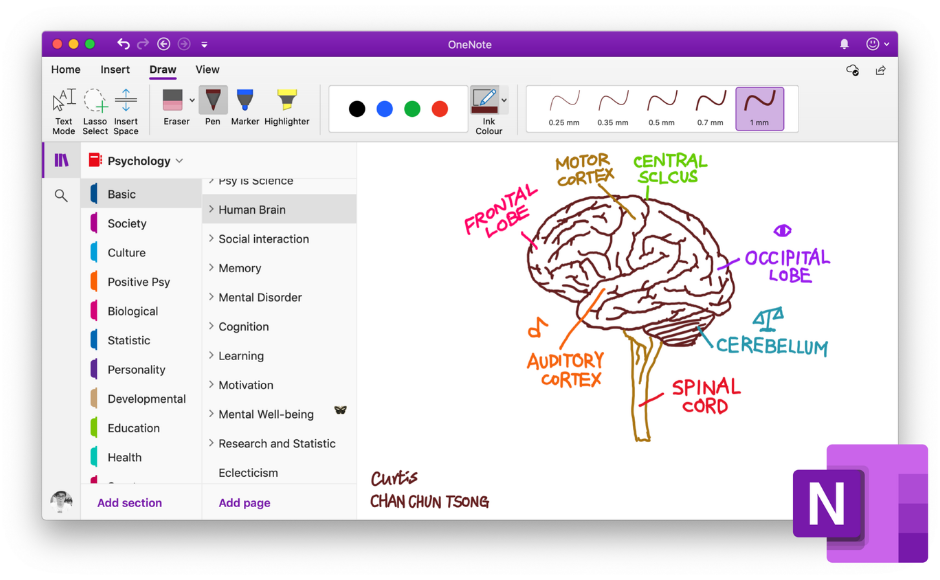
OneNote is built around the idea that a note can be anything, placed anywhere on a page. Text, images, audio recordings, handwritten sketches, file attachments, and web clippings can all coexist on a single freeform canvas. There is no rigid structure imposed on you. You click anywhere on a page and start typing or drawing. This makes OneNote exceptionally approachable for people who find structured note organization software intimidating.
Where OneNote Excels
Handwriting and stylus support is where OneNote genuinely stands apart from Notion and Obsidian. If you use a Surface tablet, an iPad with Apple Pencil, or any device with a stylus, OneNote’s inking experience is excellent. You can write, sketch diagrams, annotate PDFs, and mix handwriting with typed text seamlessly. For students in lecture halls or professionals who think visually during meetings, this capability is hard to replicate in the other two tools.
OneNote’s search is also surprisingly powerful. It performs optical character recognition on images and handwritten notes, meaning you can search for text that appears inside a photo or a handwritten scrawl. For anyone who captures information from whiteboards or printed documents, this feature alone can justify the choice.
Integration with the Microsoft ecosystem is deep and natural. OneNote works seamlessly with Outlook, Teams, and the rest of Microsoft 365. If your workplace runs on Microsoft tools, OneNote slots in without friction.
Where OneNote Falls Short
OneNote’s freeform nature is both its greatest strength and its most common frustration. Without deliberate organizational habits, notebooks can become cluttered and difficult to navigate over time. The tool offers limited markdown support, minimal customization options, and an export process that can feel restrictive if you ever want to move your notes to another platform. Sync issues across devices, while less frequent than in earlier years, still surface occasionally and can be disorienting when pages appear out of order or with missing content.
Best Suited For
OneNote is the strongest choice for students who take handwritten lecture notes, professionals who sketch diagrams alongside text, teams already invested in Microsoft 365, and anyone who values immediate usability over advanced organizational systems. If your primary need is quick, flexible capture with strong multimedia support, OneNote delivers that without a learning curve.
3. Notion: The All-in-One Workspace
Notion occupies a unique position in the note-taking app comparison because it doesn’t think of itself as just a note-taking tool. It’s a workspace that combines notes, databases, project management, wikis, and collaboration into a single platform. This ambition is what makes Notion extraordinarily powerful for some users and overwhelming for others.
Philosophy and Approach
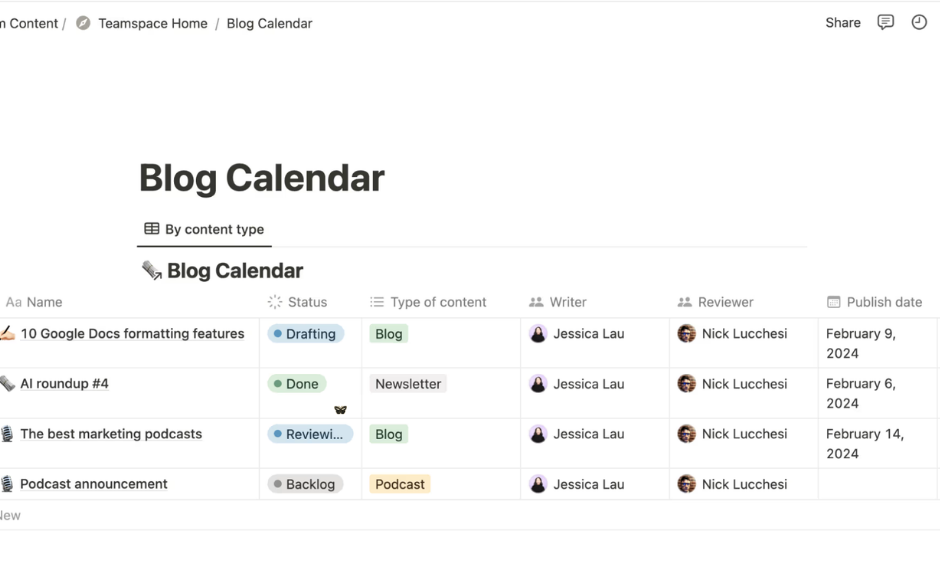
Everything in Notion is a block. A paragraph is a block. A heading is a block. A database, an embedded file, a toggle list, a callout box: all blocks. You arrange these blocks into pages, and pages can contain other pages, creating a hierarchy as deep or as shallow as you need. The real power emerges when you start using Notion’s database features, which allow you to create structured collections of information with properties, filters, sorts, and multiple views including tables, boards, calendars, and galleries.
Where Notion Excels
For project management and structured information, Notion is difficult to beat. You can build a content calendar that displays as a timeline view for planning, a board view for tracking status, and a table view for detailed editing, all from the same underlying data. This flexibility makes Notion a genuine knowledge management tool, not just a place to jot things down.
Templates are another major strength. Notion’s template gallery offers hundreds of pre-built systems for everything from habit tracking to client relationship management. For users who want a polished, functional system without building from scratch, templates provide a significant head start. The ability to share pages publicly also turns Notion into a lightweight website builder for portfolios, documentation, or resource collections.
Collaboration in Notion is robust. Multiple users can edit the same page simultaneously, leave comments, assign tasks, and manage permissions at the page or workspace level. For small teams that need a shared digital workspace without the complexity of dedicated project management software, Notion fills that gap well.
Where Notion Falls Short
Notion’s biggest limitation is its dependence on an internet connection. While offline mode has improved, the experience is still noticeably weaker than the online version. Performance can also degrade with very large databases, leading to slower load times that frustrate power users.
Privacy-conscious users should note that all Notion data lives on Notion’s cloud servers. You cannot store your notes locally, and export options, while available, don’t perfectly replicate the Notion experience in other tools. The free tier is generous for individuals, but teams hit limitations quickly that require a paid plan.
The learning curve is real. Simple note-taking in Notion is easy, but unlocking the full value of databases, relations, rollups, and formulas takes investment. Many users spend weeks customizing their setup before they start using it productively, a pattern that can easily become a form of productive procrastination.
Best Suited For
Notion is the strongest choice for project managers, content creators managing editorial workflows, freelancers juggling multiple clients, and teams that need a shared workspace. If you want your productivity note apps to double as a project management platform and a team wiki, Notion is the most capable option of the three.
4. Obsidian: The Networked Knowledge Base
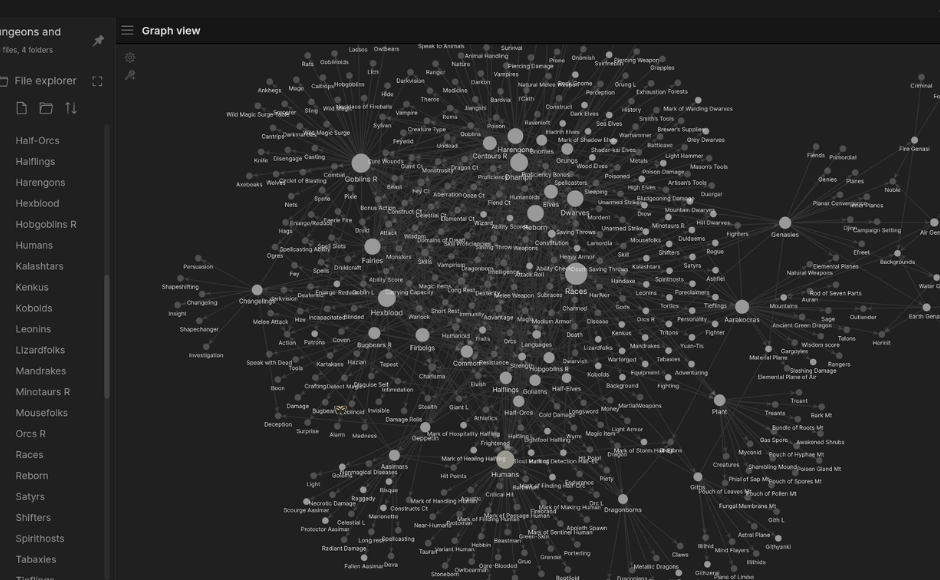
Obsidian approaches note-taking from a fundamentally different angle than either Notion or OneNote. Where those tools organize information into containers (notebooks, databases, pages), Obsidian organizes information through connections. Every note can link to any other note, and those links create a web of interconnected knowledge that grows more valuable over time.
Philosophy and Approach
Obsidian stores everything as plain markdown files in a folder on your computer. There is no proprietary format, no cloud dependency, and no vendor lock-in. Your notes are yours, stored locally, readable in any text editor, and fully portable if you ever decide to leave. This local-first philosophy appeals strongly to users who think about the long-term durability of their knowledge and who want complete control over their data.
The core interaction in Obsidian is the bidirectional link. When you create a link from Note A to Note B, Obsidian automatically shows that connection in both directions. Over time, as you link related ideas across hundreds or thousands of notes, you build a personal knowledge graph that reveals patterns and connections you might never have noticed in a traditional folder structure. This is the principle behind personal knowledge management methodologies like the Zettelkasten method, and Obsidian is the tool most naturally aligned with that approach.
Where Obsidian Excels
Data ownership is unmatched. Because your notes are plain text files, they will be readable twenty years from now regardless of whether Obsidian as a company still exists. No other mainstream note organization software offers this level of future-proofing.
The plugin ecosystem is extraordinary. The Obsidian community has built thousands of plugins that extend the tool’s functionality in almost any direction you can imagine: spaced repetition for studying, advanced graph visualization, Kanban boards, calendar integration, daily note templates, and far more. If a feature doesn’t exist natively, there is almost certainly a community plugin that provides it.
Performance is excellent. Because Obsidian works with local files rather than fetching data from a server, it opens instantly and handles vaults containing tens of thousands of notes without slowing down. For users with large, long-running knowledge bases, this speed advantage becomes increasingly noticeable.
The graph view, which visualizes all connections between your notes as an interactive network, is both practically useful and satisfying. It helps you identify isolated notes that should be connected, discover clusters of related ideas, and understand the shape of your knowledge base at a glance.
Where Obsidian Falls Short
The learning curve is the steepest of the three tools. Obsidian assumes you are comfortable with markdown syntax (or willing to learn it), and getting the most from the tool requires understanding backlinks, tags, frontmatter metadata, and vault organization strategies. For non-technical users, the initial experience can feel sparse compared to Notion’s visual polish or OneNote’s familiar metaphor.
Collaboration is Obsidian’s weakest area. There are no built-in real-time editing features. Sharing notes requires manual export, the paid Obsidian Publish service, or syncing a shared vault through third-party tools. For teams that collaborate on notes daily, this is a significant limitation.
Sync across devices requires either the paid Obsidian Sync service or manual setup using cloud storage providers. The mobile apps, while improving, still lag behind desktop in speed and plugin support.
Best Suited For
Obsidian is the strongest choice for researchers, writers, long-term knowledge builders, privacy-focused users, and anyone who thinks in connections rather than categories. If you plan to maintain a personal knowledge management system for years or decades, value data ownership, and enjoy customizing your tools, Obsidian rewards that investment like no other option.
5. Head-to-Head Comparison
With the individual profiles covered, here is how the three tools stack up directly across the dimensions that matter most when choosing digital note-taking software.
Learning Curve
OneNote is the easiest to pick up. Most users can capture and organize notes productively within minutes. Notion requires a moderate investment; simple note-taking is straightforward, but unlocking database features and advanced layouts takes dedicated learning time. Obsidian has the steepest curve, especially for users unfamiliar with markdown, but becomes exceptionally powerful once the fundamentals click.
Data Ownership and Privacy
Obsidian wins this category decisively. Your notes are local markdown files that you own completely. Notion stores everything on its cloud servers with no local-only option. OneNote stores data in Microsoft’s cloud, though enterprise users may have more control over data residency. For users who consider privacy a non-negotiable requirement, Obsidian is the clear choice.
Collaboration
Notion leads here with robust real-time editing, comments, permissions, and shared workspaces. OneNote offers solid collaboration through the Microsoft ecosystem, particularly for teams already using Teams and SharePoint. Obsidian has essentially no native collaboration features and requires workarounds for any shared use.
Mobile Experience
OneNote offers the most complete mobile experience, particularly for handwriting and stylus input. Notion’s mobile app is functional but slower and less feature-rich than desktop. Obsidian’s mobile apps work for basic editing and reading but lack full plugin support and can feel limited for heavy use.
Cost
OneNote is free with a Microsoft account, making it the most accessible option. Obsidian is free for personal use, with paid options for sync ($4/month) and publish ($8/month). Notion offers a generous free personal tier, but team features and advanced functionality require paid plans starting around $8 per user per month.
Customization
Obsidian leads by a wide margin thanks to its plugin ecosystem and CSS customization. Notion offers template-based customization with beautiful results but within defined boundaries. OneNote offers the least customization of the three.
6. Making Your Decision
If the comparison above hasn’t already pointed you toward a clear answer, this decision framework should help you narrow it down.
Choose OneNote If…
You are embedded in the Microsoft ecosystem. Handwriting and stylus input are central to how you capture information. You want something that works immediately without configuration. You take multimedia-rich notes combining text, sketches, images, and audio. You prefer freeform spatial organization over structured blocks or markdown.
Choose Notion If…
You manage multiple projects and want a single workspace for notes, tasks, and databases. Team collaboration is a regular part of your work. You enjoy visual organization and polished design. You need database functionality without learning SQL. You are building a personal dashboard, wiki, or content management system. You value templates and want a head start on organizational systems.
Choose Obsidian If…
Data privacy and long-term ownership of your notes are non-negotiable. You think in connections and want a networked knowledge base that grows smarter over time. You are comfortable with markdown or motivated to learn it. You want plain text files that remain readable regardless of what happens to any company. You enjoy customizing tools through plugins, themes, and configuration.
The Hybrid Approach
It is entirely reasonable to use more than one tool. Many professionals keep Obsidian as their long-term personal knowledge management system while using Notion for team collaboration. Others use OneNote for meeting capture and handwritten notes, then transfer key insights into a more structured system. The tools are not mutually exclusive.
7. Getting Started With Your Choice
Whichever tool you select, the first two weeks matter more than you might expect. Here is how to start well with each option.
Starting With OneNote
Create one notebook with three to five sections that reflect your main areas of focus (such as work, personal, projects, reference, and meetings). Resist the urge to create dozens of sections upfront; let your structure emerge from actual usage. Learn the keyboard shortcut for quick notes and practice tagging pages for easy retrieval. Set up sync on all your devices within the first day so that capture is frictionless wherever you are.
Starting With Notion
Begin with a single page, not a complex database. Write a few notes, create a simple to-do list, and get comfortable with the block-based editor before attempting anything advanced. After a few days, explore the template gallery and import one template that matches a real need. Build your first database only after you understand how pages and blocks work. The most common mistake with Notion is over-engineering a complex system before you have enough content to justify it.
Starting With Obsidian
Create a vault and write ten notes on topics you know well. Focus on creating links between those notes whenever a natural connection exists. Install no more than three plugins in your first week (a good starting set: Calendar, Templater, and Dataview or a similar utility). Read about the daily notes workflow, which provides a low-friction entry point for building a regular note-taking habit. Resist the temptation to design the perfect folder structure before you start; in Obsidian, links matter more than folders.
Universal Advice
Regardless of your choice, start simple and add complexity only when you feel a genuine need. Establish consistent naming conventions early. Schedule a brief weekly review to clean up stray notes and evaluate whether your system is serving you or creating busywork. The goal is not a beautiful system. The goal is a useful one.
Finding Your Fit
The best digital note-taking software is the one you actually use consistently. That sounds like a cliche, but it is the most reliable truth in the productivity tool space. A perfectly chosen tool that you abandon after three weeks delivers less value than a “good enough” tool that becomes part of your daily routine.
Give your chosen tool an honest two-week trial. Use it for real work, not just experimental tinkering. Pay attention to the moments when it helps you think more clearly or find information faster, and pay equal attention to the moments when it creates friction or frustration. After two weeks, you will have a much clearer sense of whether the tool fits your workflow or whether another option deserves a try.
And if you do switch, that is perfectly fine. Good note-taking practices (clear writing, consistent structure, regular review) transfer across any tool. The habits matter more than the platform.